Features built for safe, deep media cleanup
Media Purge isn’t a blunt “delete unused files” button. It’s an intelligent WordPress unused media scanner and a complete scan → verify → trash → recover workflow — free for core cleanup, with no artificial scan limits.
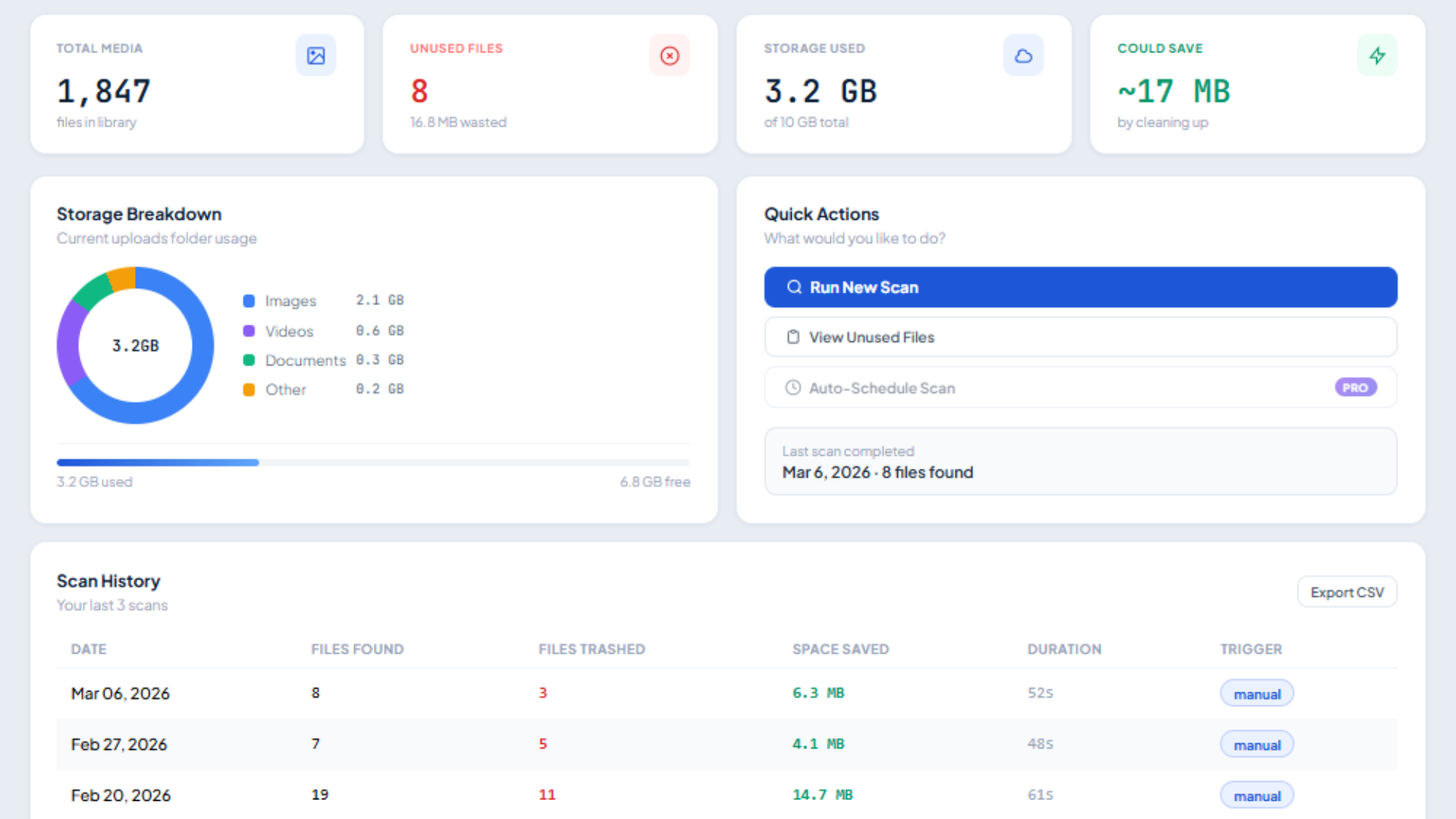
Built for real WordPress sites — not just post content
Smart Unused Media Scanner
Inspects post content, meta fields, featured images, WooCommerce product galleries, widgets, and customizer uploads with exact file sizes shown so you can prioritize what to clean.
- • Post content & meta fields
- • Featured images & galleries
- • Widgets & Customizer uploads
- • Exact file size per item
Deep Builder Scanning
Parses Elementor JSON data, Divi module & layout meta, WPBakery shortcodes, and Beaver Builder layouts — plus Gutenberg blocks and classic markup.
- • Elementor JSON meta
- • Divi layout data
- • WPBakery shortcodes
- • WooCommerce gallery assets
“Used In” Display
Shows exact post title, post type, and context (e.g. Featured Image on “About Us” or Elementor widget on “Home”) with direct edit links before you touch a file.
- • Exact post & page titles
- • Post type identification
- • Specific location context
- • One-click direct edit links
Safe Trash Flow
Unused files go to an internal trash — never an instant permanent delete. Default retention is 30 days and adjustable in Settings, so you have time to restore a mistake.
- • Zero instant deletes
- • 30-day default retention
- • Configurable in settings
- • Check Used In before you trash
Recovery Tab
Browse trashed media anytime, preview thumbnails, and restore individual files or bulk-restore in one click. Permanently delete only when you are 100% ready.
- • Full trashed item browser
- • One-click file restore
- • Bulk restore support
- • Manual permanent purge
Duplicate Detection
Files are grouped by MD5 cryptographic hash. Identical duplicates appear together with wasted-storage context — regardless of what filenames they were given.
- • MD5 byte-level matching
- • Grouped duplicate view
- • Wasted storage metrics
- • Filename-independent
Storage Analytics
Colour-coded visual breakdown by Images, Videos, Audio, Documents, and Other — plus overall library counts, unused counts, and potential storage savings.
- • MIME-type distribution
- • Total library size
- • Recoverable space metrics
- • Clear visual charts
Type Filters & CSV Export
Filter unused media by format in one click. Export full unused lists and audit reports to CSV for client approval, agency handoffs, or peace of mind.
- • One-click type filters
- • Instant CSV report export
- • Full item metadata
- • Ideal for client audits
Full compatibility across the modern WordPress ecosystem
Elementor
Widgets, backgrounds, galleries in JSON meta
Divi
Module meta, layouts, and custom builder attributes
WooCommerce
Product thumbnails, catalog images & full gallery arrays
Gutenberg Blocks
Image, Gallery, Cover, Media & Text blocks & attachment IDs
WPBakery
[vc_*] shortcode image attributes and visual composers
Beaver Builder
Layout posts, node settings, and custom module photos
Classic Editor
Standard tags, captions, and shortcodes
Widgets & Customizer
Header images, site icons, logo uploads & stored URLs
Automation later. Core cleanup stays free.
Planned paid-tier ideas include one-click duplicate merge, scheduled auto-cleanup, advanced analytics, and virtual folder organization. They are labelled “Coming Soon” in the plugin. Scan → review → trash → restore will always be free.
Frequently Asked Questions
Clean your media library with complete confidence
Join WordPress site owners who keep their media libraries fast, lean, and organized without risking live layouts.
Plugins → Add New → search “Media Purge”